In our hyper-connected digital era, where everything from our finances to our social lives resides online, cybersecurity has transcended from a niche IT concern to a fundamental life skill. The threat landscape is not static; it evolves daily, with cybercriminals devising increasingly sophisticated methods to exploit vulnerabilities. For the individual user, this can feel overwhelming. However, achieving robust digital protection doesn’t require a degree in computer science. It hinges on understanding core principles and implementing consistent, smart habits. This comprehensive guide delves into the most critical cybersecurity best practices you need to adopt today to safeguard your digital existence, protect your privacy, and navigate the online world with confidence.
Understanding the Modern Digital Threat Landscape
Before we dive into the solutions, it’s crucial to understand the problems we face. Cyber threats are diverse and target different aspects of your digital life.
A. Phishing and Social Engineering: This remains the most common attack vector. Instead of hacking complex software, hackers “hack” human psychology. They use deceptive emails, text messages (smishing), or phone calls (vishing) that appear to be from legitimate sources (like your bank, a popular service, or even a colleague) to trick you into revealing passwords, financial information, or downloading malicious software.
B. Malware: This is a blanket term for malicious software, including viruses, ransomware, spyware, and trojans. Once installed on your device, it can steal data, encrypt your files for ransom, monitor your keystrokes, or turn your device into a bot for larger attacks.
C. Unpatched Software: Software vulnerabilities are like unlocked doors in your digital house. Developers constantly release updates (patches) to lock these doors. Failing to install these updates leaves you exposed to attacks that specifically target these known weaknesses.
D. Weak and Reused Passwords: Simple passwords are easy to crack with brute-force attacks. Even more dangerous is password reuse. If one service you use suffers a data breach, hackers will immediately try that same email-password combination on every other major service (email, bank, social media), often with devastating success.
E. Unsecured Networks: Public Wi-Fi networks at cafes, airports, and hotels are often unencrypted. This means any data you send or receive can potentially be intercepted by others on the same network.
A. Master the Art of Password Management and Authentication
The first line of defense for most of your online accounts is your password. Strengthening this barrier is non-negotiable.
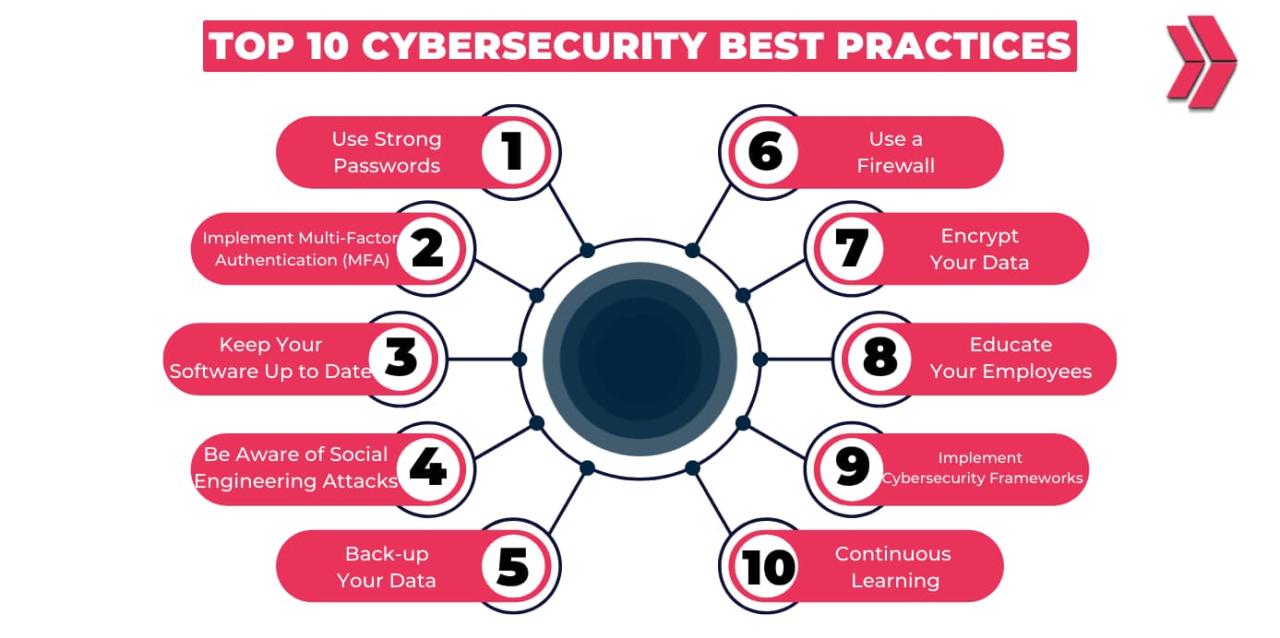
1. Embrace Password Managers: Remembering dozens of strong, unique passwords is impossible for a human. A password manager solves this. It generates and stores complex, random passwords for every site you use. You only need to remember one master password. Reputable options include Bitwarden (a great free option), 1Password, and LastPass. This eliminates the habit of password reuse entirely.
2. Implement Multi-Factor Authentication (MFA/2FA): This adds a critical second layer of security. Even if a hacker steals your password, they cannot access your account without a second factor. This is typically:
-
Something you have: A code from an authentication app (like Google Authenticator or Authy) or a physical security key (like a YubiKey).
-
Something you are: A fingerprint or facial recognition scan.
-
Enable MFA everywhere it is offered, especially on your primary email account, financial institutions, and social media profiles. An authentication app is more secure than SMS-based codes, which can be hijacked through SIM-swapping attacks.
3. Create Strong Passphrases: For accounts where you must create and remember a password (like your master password for the manager), use a passphrase. This is a sequence of random words that is long yet easier to remember than a complex string of characters. For example, Blue-Giraffe-Jumps-High-42! is far more secure than P@ssw0rd123.
B. Fortify Your Defenses: Software and Network Security
Your devices and your internet connection are the gateways to your data. Securing them is paramount.
1. Prioritize Software Updates: Never ignore update notifications. These patches fix critical security flaws that hackers are actively exploiting. Enable automatic updates for your operating system (Windows, macOS, iOS, Android), web browsers, and all applications. This ensures you are protected as soon as a fix is available.
2. Install and Maintain Reputable Security Software: A robust antivirus and anti-malware suite is essential, even on macOS and Linux. These programs provide real-time protection against malicious downloads, phishing attempts, and other threats. Choose a well-reviewed solution from a trusted provider and keep its virus definitions updated.
3. Secure Your Home Wi-Fi Network: Your home router is the heart of your connected life. Change its default administrator username and password to a strong, unique combination. Enable WPA3 encryption (or WPA2 if WPA3 is unavailable). Also, change the network name (SSID) to something that doesn’t personally identify you or your address.
4. Utilize a Virtual Private Network (VPN): A VPN encrypts all internet traffic between your device and a remote server. This is absolutely essential when using any public Wi-Fi network, as it creates a secure tunnel that shields your activity from eavesdroppers. Even at home, a VPN can enhance your privacy by masking your IP address from the websites you visit. Choose a VPN provider with a strict no-logs policy and a strong reputation for privacy.
C. Cultivate Skeptical and Secure Online Habits
Technology can only do so much; the user is often the weakest link. Developing a mindset of healthy skepticism is your best personal defense.
1. Become a Phishing Detection Expert: Scrutinize every email and message asking for information or action.
-
Check the sender’s email address: Hover over the “from” name to see the actual address. Often, phishing emails come from addresses that mimic real ones but have slight misspellings or different domains.
-
Look for grammatical errors and urgency: Poor grammar and urgent language designed to panic you into acting quickly are major red flags.
-
Don’t click on links: Instead of clicking a link in an email, go directly to the company’s official website by typing the URL yourself or using a bookmarked link.
-
Verify requests for sensitive data: If you receive an unexpected email from your “CEO” or “IT department” asking for gift cards or passwords, verify it through a different communication channel, like a phone call.
2. Practice the Principle of Least Privilege: Only install apps and software from official, trusted sources like the Apple App Store, Google Play Store, or official developer websites. When installing software, pay attention to the permissions it requests. Does a simple flashlight app really need access to your contacts and location? Deny unnecessary permissions.
3. Manage Your Digital Footprint: Be mindful of the personal information you share publicly on social media. Information like your birthdate, pet’s name, mother’s maiden name, and address are often used as security questions for account recovery. Sharing this makes it easier for attackers to social engineer their way into your accounts. Regularly review and tighten your privacy settings on all social platforms.
4. Back Up Your Data Religiously: Ransomware can encrypt your files, and hardware can fail. The only true defense is maintaining regular, automated backups. Follow the 3-2-1 backup rule:
-
3 copies of your data.
-
On 2 different types of media (e.g., an external hard drive and a cloud service).
-
With 1 copy stored off-site (e.g., the cloud or a drive at a different location).
-
Use tools like Time Machine for Mac or File History for Windows to automate local backups and a service like Backblaze or iCloud for off-site protection.

D. Advanced Protections for the Security-Conscious User
For those looking to go the extra mile, these steps offer enhanced security.
1. Adopt DNS Filtering: Change your device’s or router’s DNS settings to a service that filters out malicious websites, such as Cloudflare’s 1.1.1.1 (with families) or Quad9. This can block connections to known phishing and malware sites at the network level, adding a powerful layer of protection for all devices on your network.
2. Use Privacy-Focused Tools: Consider switching to a more private search engine like DuckDuckGo and a browser that prioritizes user privacy, such as Brave or Firefox with strict privacy settings configured. These tools reduce the amount of data collected about your online activities.
3. Encrypt Your Devices: Enable full-disk encryption on all your devices. This is FileVault on macOS and BitLocker on Windows Pro editions. On smartphones, ensure your device encryption is turned on (it usually is by default when a passcode is set). This ensures that if your device is lost or stolen, the data on it remains unreadable without your password.
Conclusion: Cybersecurity is a Continuous Journey
There is no single silver bullet for complete cybersecurity. Instead, it is an ongoing process of vigilance, education, and adaptation. By layering these practices strong, unique passwords managed by a password manager, ubiquitous multi-factor authentication, consistent software updates, a healthy dose of skepticism, and regular backups you create a defensive mosaic that is incredibly difficult for attackers to penetrate. Start by implementing one or two tips from this guide, and gradually incorporate more into your digital routine. Taking proactive steps today will dramatically reduce your risk and empower you to take control of your online privacy and security tomorrow.